

Manage renewals and expiration
Use this guide to change auto-renewal, configure reminders, or act when a domain is expiring or has been deleted.
Choose your task
- Turn auto-renewal off or on
- Configure expiration reminders
- Delete a domain immediately
- Restore an expired or deleted domain
- Fix a renewal or expiration problem
Auto-renewal
Turn auto-renewal off or on
To let a domain expire:
- Open Domains and select the domain.
- Select Disable auto-renew on the renewal card.
- Confirm the change.
To keep a domain that is set to expire, select Enable auto-renew before its expiration date.
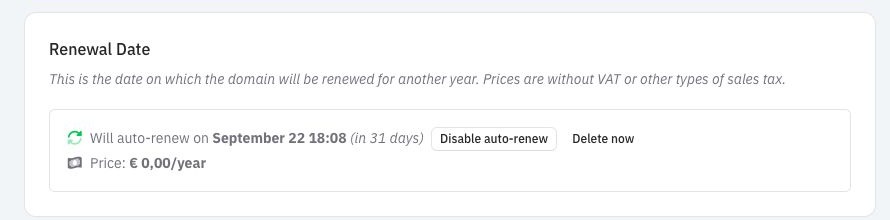
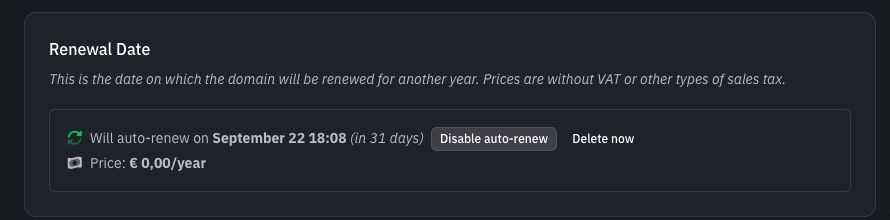
The screenshot uses a reserved .example domain, so its price is zero. Public TLDs show their current renewal price.
What happens next
The card changes to Expiration Date after the registry accepts the setting. To keep the domain, select Enable auto-renew before that date.
Do not wait until the final day. Registries can have earlier processing cutoffs, and a setting may remain pending for a while. If an update fails, Domain Chief keeps the last setting confirmed by the registry and shows a notice with the next action. See Resolve action-required notices for failed-update choices and dismissal behavior.
Disabling auto-renewal does not delete the domain immediately. Its website, email, and DNS continue to work until the registry expires or deletes it.
Read the renewal card
Open Domains, select the domain, and read these values:
- Renewal Date means auto-renewal is enabled. Domain Chief will renew the domain on the displayed date.
- Expiration Date means auto-renewal is disabled. The domain is expected to expire on the displayed date unless you enable it again.
- Price is the current renewal price for the TLD and team. VAT or other sales tax is not included.
Understand renewal periods
Most domains renew yearly, but some TLDs use a longer minimum period. The renewal card states whether the next renewal adds one year or several years, and its price uses the same period.
The date can also change after a transfer. The transfer form explains whether that TLD keeps, resets, or extends the current term before you submit it. See Transfer a domain for those cases.
Configure expiration reminders
Open Settings and find Expiry Reminder Preference. This preference belongs to each team member, so colleagues can make different choices.
- Weekly summary sends one Monday email listing the team's domains that renew or expire within the next 14 days.
- Individual reminders sends one email per domain seven days before its renewal or expiration date.
Domain Chief always sends upcoming expiration reminders and invoice-related emails, even when optional activity notifications are disabled.
Delete or restore a domain
Delete a domain immediately
Delete now is different from disabling auto-renewal. It asks the registry to delete the domain now instead of keeping it until the displayed expiration date.
Deletion may be irreversible
Use Delete now only when you intend to give up the domain immediately. There is no refund for unused registration time. Depending on the registry, deletion can be immediate, scheduled, or followed by a paid restoration period, and recovery is not guaranteed.
To request deletion:
- Select Delete now on the renewal card.
- Read the registry-specific warning in the confirmation window.
- Type the full domain name exactly as shown.
- Select Delete domain.
After requesting deletion
Domain Chief returns you to the dashboard after accepting the request. A registry may take time to process it.
Testing domains behave differently. A .example domain has no registry quarantine and cannot be restored after deletion.
Restore an expired or deleted domain
The exact lifecycle belongs to the TLD registry. A domain may stop resolving as soon as it expires, may remain in a grace state, or may enter quarantine after deletion. Domain Chief updates the domain page as it receives registry information.
If restoration is available, the page shows Domain Can Be Restored and, when known, the final restoration date. Contact support from that notice as soon as possible. Restoration can carry a separate fee and may require registry action, so do not treat the final date as a safe deadline.
After the restoration period ends, the registry may permanently delete the domain. It might later become available for anyone to register, but neither its timing nor your ability to recover it is guaranteed.
Troubleshooting
Why does auto-renewal still show as pending?
Wait for the registry operation to finish before changing the setting again. The pending notice shows the requested state. If the registry rejects it, the card returns to the previously confirmed state.
Why did the renewal date pass without moving?
Registry updates are not always immediate. Reload the domain page and check the activity history. Contact support if the renewal date remains overdue or the domain has stopped working.
What should I do if a domain expired unexpectedly?
Open the domain and read the notice before making another change. Enable auto-renew if the domain is still active and the control is available. If the page offers restoration, contact support immediately.
What should I do if deletion was requested by mistake?
Contact support immediately and include the domain name. Do not wait for the domain page to change. Whether the request can be stopped or reversed depends on the registry and its current processing stage.